
Baby Panda's Breakfast Cooking
BabyBusEducational
4.2132.00 Reviews
- Version
- 8.76.00.00
- Installs
- 10.00M
- Age Rating
- Everyone
Screenshots
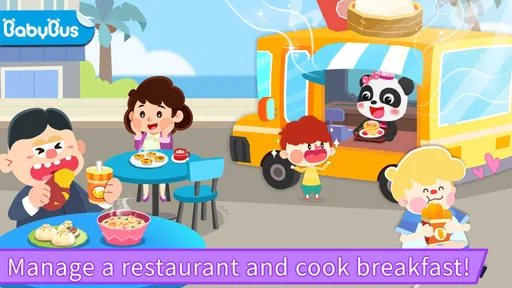
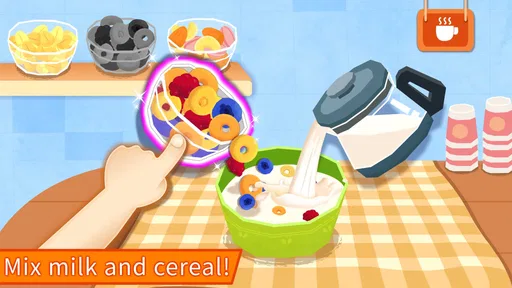
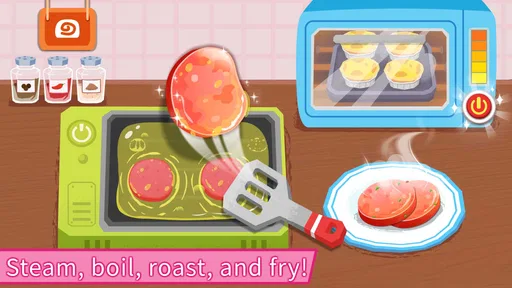
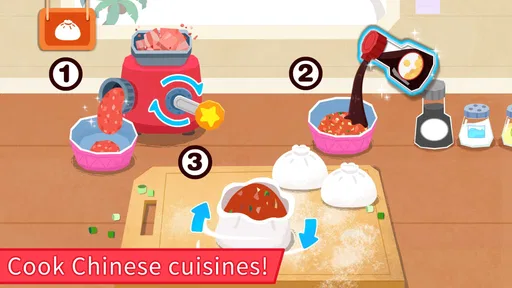

Our Review of Baby Panda's Breakfast Cooking
 Analysis by Appyee
When I first opened Baby Panda's Breakfast, I understood its appeal almost immediately: it turns a familiar morning routine into a gentle cooking activity that young children can explore without needing to read long instructions. The game comes from BabyBus and sits in the educational category, using breakfast preparation as its central theme. Instead of presenting cooking as a complicated recipe lesson, it breaks the experience into small, visible actions that are easy for a child to follow.
That simplicity is the main reason I would recommend it to families looking for a calm first cooking game. A child can make eggs, pancakes, and other morning dishes while practicing basic sequencing, attention, and hand control. It is not a replacement for real kitchen supervision or a complete nutrition lesson, but it can make the idea of preparing food feel approachable. The game is free to start, rated for Everyone, and has become a widely used choice, with more than 10 million installs and an average rating of 4.2 from roughly 32 thousand ratings.
What the first breakfast experience feels like
The first thing to expect is a playful routine rather than a traditional game with difficult levels, timers, or competitive scoring. The focus is on choosing ingredients and carrying out cooking actions in a friendly visual environment. That makes the experience suitable for children who may not yet be comfortable reading, because the activity is communicated largely through pictures, movement, and immediate feedback.
I found the breakfast theme particularly useful for younger players because it connects the screen to something they already recognize. Eggs and pancakes are not abstract objects; they are foods children may see at home. That connection gives the activity more meaning than simply tapping colorful items. A parent can use the game as a starting point for talking about what happens before a meal, which ingredients belong together, and why adults use care around hot cooking surfaces.
The selection of morning meals also helps prevent the experience from feeling like one repeated action. The game includes more than ten breakfast choices, so a child can return to the kitchen with a little variety. I would still keep expectations realistic: this is a short, playful learning experience, not a deep cooking simulator. Children who want elaborate recipes, open-ended building, or a strong sense of progression may find it limited after the novelty fades.
What works well is the low pressure. A child can concentrate on the next action without worrying about failing a difficult challenge. That makes it a good option for a quiet period before school, a short supervised activity while breakfast is being prepared, or a gentle introduction to tablet games. It is less suitable for an older child who wants strategy, precise resource management, or a substantial story.
Why the breakfast theme has educational value
The educational benefit is subtle rather than classroom-like. Preparing a dish naturally introduces order: ingredients come before mixing, mixing comes before cooking, and cooking comes before serving. When I let a child describe what should happen next instead of immediately helping, the game became a useful exercise in prediction and memory.
There is also a practical opportunity to connect virtual actions with real-world habits. After making a pancake in the game, a parent might ask the child to identify a pancake on the table, name its ingredients, or help place napkins nearby. The app itself should not be treated as proof that a child can safely cook alone, but it can create a bridge toward supervised participation in simple kitchen tasks.
One less obvious strength is that the game gives children a contained place to repeat actions. Repetition is valuable at this age, especially when a child is learning to coordinate taps, drags, and choices. Rather than rushing them toward a new challenge, I would let them repeat a favorite breakfast and explain each step aloud. That turns a few minutes of play into a small communication and sequencing exercise.
First setup: making the opening session easy
Before handing over the device, I would install the game on a phone or tablet with enough battery and a comfortable screen size. The minimum operating system is Android 6.0, so it can work on some older Android devices, although the actual experience will naturally depend on the device’s screen, speed, and available storage. A larger display is preferable for small children because cooking actions are easier to see and touch accurately.
The game is free, but it includes optional in-app purchases priced from $1.99 to $3.99 per item. I recommend checking the device’s purchase controls before a child begins playing. This is not because the cooking activity is difficult to access, but because young children may tap through a purchase prompt without understanding that it involves real money. Setting those controls in advance makes the first session more relaxed for everyone.
I would also begin with an adult nearby. The content rating is Everyone, which fits the gentle breakfast theme, but an age rating does not tell a child how long to use a screen or how to behave around a real stove. A short introduction from a parent can establish the right boundary: the game is for pretend cooking, while real cooking happens only with an adult.
On the first launch, I would avoid explaining every possible meal or trying to demonstrate the entire game. A better setup is to let the child look at the kitchen, choose a breakfast item, and ask what they think will happen next. This keeps the child involved instead of turning the session into a tutorial delivered by the adult.
The game was released on April 28, 2020, and its current version is 8.76.00.00. Those details matter mainly when checking compatibility or deciding whether an update is available. I would not make the version number part of the child’s experience; the useful preparation is simply having the device ready, purchase settings handled, and an adult available for the first few minutes.
How I would guide a first-time child
I would use three simple questions: “What are we making?”, “What do we need first?”, and “What should we do next?” These questions encourage the child to observe the screen rather than tap randomly. If the child makes a mistake, I would wait briefly before correcting them. The game is most useful when the child gets a chance to notice the result and try again.
For a child who is still developing fine motor control, I would choose a larger device and keep the session short. Small targets can become tiring, and frustration can make an otherwise friendly game feel difficult. If the child is using a phone, holding it steady on a table may work better than asking them to balance it in both hands while dragging ingredients.
Another helpful habit is to play without background distractions. If a television is running or several adults are giving instructions at once, the child may focus on tapping quickly rather than understanding the order of actions. A quiet first session makes it easier to see whether the interface feels intuitive for that particular child.
The first successful action
The first meaningful success should be completing one breakfast item from beginning to end, not merely opening the game or tapping a colorful object. I would start with whichever meal looks most familiar to the child, then let them lead. The goal is to notice the pattern of selecting, preparing, cooking, and finishing rather than completing every available dish immediately.
When the child reaches the finished meal, I would pause for a moment and ask them to explain what they did. This small reflection is more valuable than moving straight to another recipe. It checks whether they understood the sequence or simply followed visual prompts. Even a short answer such as “I mixed it and then cooked it” shows that the game is supporting ordered thinking.
A useful household routine is to play before a real breakfast and then compare the virtual meal with the one on the table. The child might point out colors, shapes, or ingredients. This works especially well when the adult keeps the comparison simple and avoids turning the game into a test. The purpose is to make the virtual activity feel connected to ordinary life.
I also like using the first completed dish to practice patience. Instead of rushing through the next option, the child can look at the finished result and decide whether they want to repeat it or try something different. This gives them a small choice without overwhelming them with too many instructions.
A realistic morning use case
Imagine a child has woken early while a parent is preparing breakfast. The adult can set up the game at the table, choose one meal, and stay nearby while handling the real food. The child follows the virtual steps, then helps with a safe task in the real kitchen, such as carrying a spoon or placing a napkin. The screen activity occupies the child constructively, while the adult keeps the real cooking area under control.
This scenario works because the game has a clear beginning and end. It is easier to stop after one completed breakfast than after an endless stream of random mini-games. I would still avoid using it as a way to distract a child near an unattended stove. The app can support a supervised routine, but it should never replace supervision.
Where children may become confused
The biggest source of confusion is likely to be the difference between pretend actions and real cooking actions. A child may understand that tapping the screen makes food appear, but that does not mean they understand why a real pan is hot or why ingredients must be handled carefully. I would state that distinction clearly, especially after a child finishes a virtual egg or pancake.
Another possible difficulty is that a child may treat the game as a sequence of taps rather than a cooking process. If they rush through every prompt, the educational value becomes thinner. Parents can slow the experience down by asking the child to name each ingredient or predict the next step. This is a better intervention than taking the device away at the first sign of rapid tapping.
Some children may also expect a broader game world, character customization, or a reward system that keeps expanding. This title is centered on breakfast preparation, so its appeal depends on whether the child enjoys repeating familiar food activities. If a child loses interest after trying a few meals, that does not mean the game failed; it may simply mean the theme has served its purpose.
The optional purchases are another point where adult guidance matters. A child may see content that appears interesting and assume it is part of ordinary play. Because individual items cost money, I would explain before playing that some choices may require an adult. If the child is too young to understand that boundary, purchase restrictions are the safer solution.
There is also a difference between a game being rated for Everyone and being ideal for every child. A child who dislikes food-themed play, becomes frustrated by touch controls, or needs a more active physical experience may not connect with it. In those cases, a hands-on activity with play food, picture cards, or supervised real ingredients could be a better fit.
Small adjustments that improve the experience
One practical tip is to let the child choose only between two meals at first. Presenting the full selection immediately can make the opening feel less focused, while two choices create a clear decision without taking away control. After the first successful dish, the child can explore more freely.
A second tip is to use the game as a language exercise. Ask the child to describe textures they imagine, identify colors, or tell a short story about who will eat the breakfast. This adds value without pretending that the app teaches advanced cooking skills. It also helps a parent notice whether the child is following the process or only reacting to animation.
A third tip is to stop at a natural endpoint rather than waiting for frustration. Finishing one meal, talking about it, and putting the device away can leave the child with a stronger sense of achievement than playing until attention disappears. The game’s short, self-contained cooking activities make that kind of stopping point easy to create.
How it compares with ordinary alternatives
Compared with a real cooking lesson, the game is safer and more accessible but far less complete. It can show a child that breakfast involves an order of actions, yet it cannot teach heat, texture, smell, measuring, hygiene, or the consequences of using a real utensil incorrectly. I see it as a preparation for conversation, not a substitute for an adult-led kitchen activity.
Compared with a coloring app, it offers more sequence and decision-making. The child is not only filling a screen with color; they are moving toward a finished meal. That gives the play a stronger sense of purpose. On the other hand, a coloring activity may be better for a child who wants open-ended creativity rather than following a recipe-like path.
Compared with fast arcade games, this BabyBus title is calmer and more forgiving. There is less pressure to react quickly, which suits preschool-age players and children who are still learning touch controls. The trade-off is that older children may find the lack of challenge too gentle. For them, a more advanced cooking game with planning or time management would probably hold attention longer.
Compared with watching a cooking video, the interactive format asks the child to participate. That is a real advantage for attention and recall. However, a video can show actual food preparation and real safety behavior in a way a cartoon kitchen cannot. If the goal is learning how a real pancake is made, a short, carefully chosen video watched with an adult may be more informative.
The next step after the first session
After the child has completed one meal comfortably, I would introduce a simple goal: try a different breakfast and explain one way it differs from the first. This keeps the focus on observation rather than collecting every option. It also gives the child a reason to remember what they did previously and compare the new sequence.
For a preschool group or siblings, the game can become a turn-taking activity. One child chooses the meal while another describes the next action, then they switch roles. I would keep the group small because too many children reaching for one screen can turn a quiet game into an argument. The app is strongest when each child has time to observe and act.
Parents can also use the breakfast theme to introduce responsibility in a very small way. After playing, the child might help set the table or put away an unbreakable item. This reinforces the idea that meals involve preparation and cleanup, while keeping the real-world task safe and age-appropriate.
At this point, it is worth deciding whether the game still matches the child’s needs. If the child enjoys repeating recipes and talking about food, it can remain a pleasant occasional activity. If they are asking for more challenge, more creativity, or actual cooking skills, I would move toward supervised hands-on tasks or a more advanced educational game instead of expecting this one title to grow with them indefinitely.
My overall view is positive, with clear limits. Baby Panda's Breakfast Cooking is best as a gentle first step into cooking-themed play: approachable, familiar, and easy to connect with a child’s daily routine. Its free entry makes it simple to try, while the optional purchases mean an adult should prepare purchase controls beforehand. I would recommend it to families with young children who want a calm educational game and are willing to join the first session.
I would skip it for children seeking complex gameplay, realistic culinary instruction, or a long-term challenge system. For everyone else, the most rewarding approach is not to hand over the device and walk away, but to use one completed breakfast as a prompt for questions, turn-taking, and safe real-world participation. In that role, the game does something modest but useful: it makes the steps behind a familiar meal visible and inviting.
Verdict
Strengths of Baby Panda's Breakfast Cooking
- Simple controls make it easy for young children to play independently.
- Bright animations and friendly characters create an inviting experience.
- Cooking steps encourage basic sequencing and following instructions.
- Short activities suit children with limited attention spans.
- Works well as a casual, low-pressure game for preschoolers.
Limitations of Baby Panda's Breakfast Cooking
- Gameplay may feel repetitive after children complete the recipes.
- Some activities offer limited challenge for older kids.
- Frequent prompts can make the experience feel overly guided.
- The cartoon presentation may not appeal to children seeking realistic cooking.
- Parents should check in-app purchase and advertising settings before use.
Other Releases by BabyBus
View All
Little Panda Policeman
Educational4.0

Little Panda's Chinese Recipes
Educational4.4

Little Panda's Restaurant
Educational4.4

Little Panda's Ice Cream Games
Educational4.3
Similar Picks in This Category
View AllLittle Panda Policeman
BabyBus4.0

Monster Trucks Game for Kids 2
Raz Games4.1
Little Panda's Chinese Recipes
BabyBus4.4
Little Panda's Restaurant
BabyBus4.4
Little Panda's Ice Cream Games
BabyBus4.3

Baby Panda Care
BabyBus3.8
Frequently Asked Questions
What is Baby Panda's Breakfast Cooking?
Baby Panda's Breakfast Cooking is a child-friendly cooking game in which players prepare popular breakfast dishes through simple, interactive activities. Children can choose ingredients, follow basic preparation steps, cook food, and decorate or serve the finished meals. Its colorful graphics, cheerful characters, and easy controls are designed to make pretend cooking entertaining while introducing young players to everyday kitchen routines.
Is Baby Panda's Breakfast Cooking suitable for young children?
The game is designed mainly for preschool and early-school-age children, with straightforward controls and activities that do not require advanced reading or gaming experience. Most actions involve tapping, dragging, choosing ingredients, and following visual instructions. Parents should still check the recommended age rating and review the current privacy, advertising, and in-app purchase information before allowing a child to play independently.
Does Baby Panda's Breakfast Cooking require an internet connection?
Basic cooking activities may be available without a constant internet connection, which can make the game convenient for travel or offline play. However, certain features—such as advertisements, updates, external links, or additional content—may depend on internet access. Availability can vary by device version, so it is best to test the installed game in airplane mode rather than assuming every feature works offline.
Are there advertisements or in-app purchases in Baby Panda's Breakfast Cooking?
The presence of advertisements, optional purchases, or links to other games can depend on the version downloaded and the platform where it is installed. Because this is a children-focused app, adults should inspect the store listing and the in-game parental settings before handing over the device. Using family controls or disabling unauthorized purchases is recommended to prevent accidental taps from creating charges.
What can children learn from playing Baby Panda's Breakfast Cooking?
Along with providing a playful cooking experience, the game can help children practice hand-eye coordination, following sequences, recognizing ingredients, and making simple choices. It may also encourage creativity when preparing or decorating meals. This should be viewed as pretend play rather than a substitute for real kitchen instruction; children should always be supervised around actual food, heat, sharp tools, and kitchen appliances.
Play our best games!


